Best ATS-Friendly Resume Guide: Essential Tips for 2025
BlogTable of Contents
- Introduction: The Rise of AI Resume Screening
- What is an ATS and Why Does It Matter in 2025?
- How AI Resume Screening Works Today
- Step 1: Decode the Job Description Like a Pro
- Step 2: Choose the Right ATS-Friendly Resume Format
- Step 3: Master Resume Keywords Strategy
- Step 4: Write Each Section for Maximum ATS Score
- Step 5: Avoid Common ATS Resume Mistakes
- Step 6: Optimize File Format and Submission
- Step 7: Test Your Resume Before Applying
- Step 8: Industry-Specific ATS Optimization
- Step 9: Balance ATS Optimization with Human Appeal
- Step 10: Advanced ATS Strategies for 2025
- Free ATS Resume Tools and Resources
- Conclusion: Your ATS-Friendly Resume Action Plan
Introduction: The Rise of AI Resume Screening
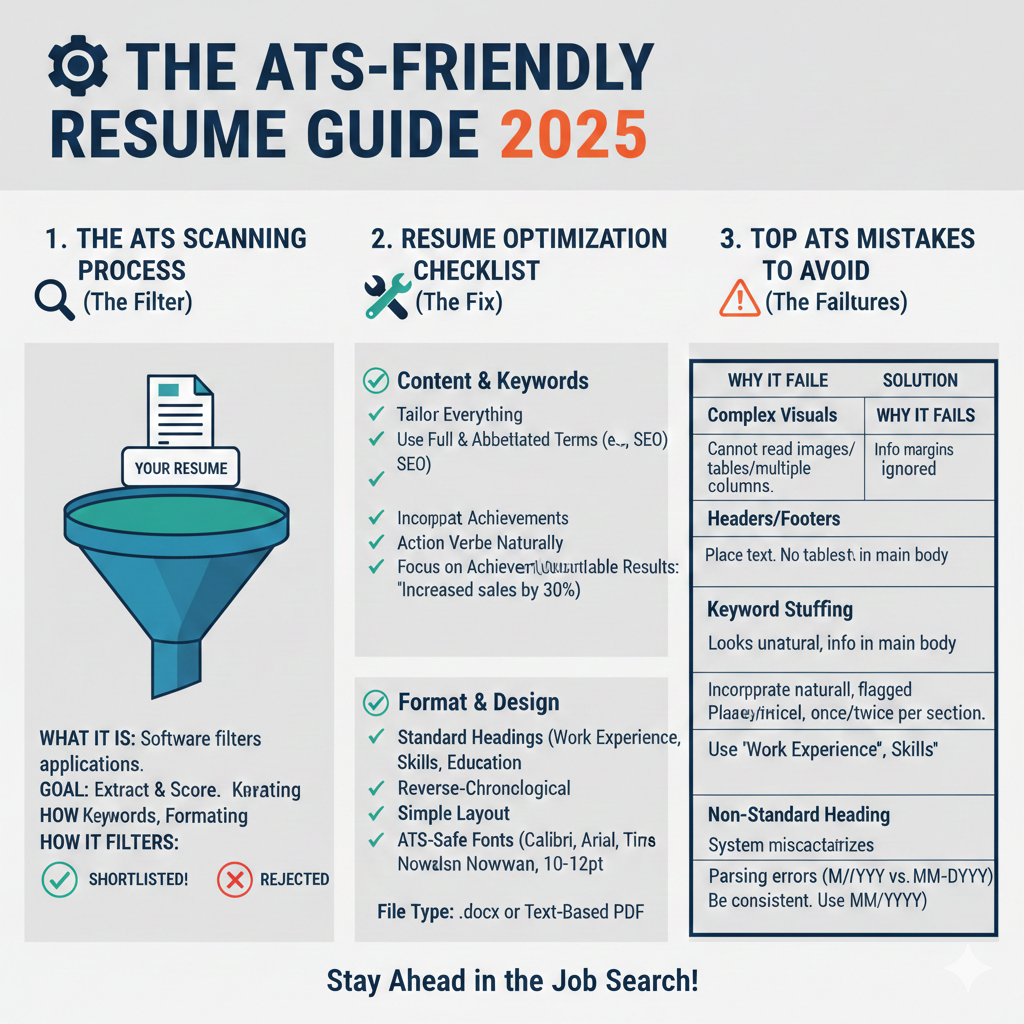
The job application process has fundamentally changed. Learning how to write an ATS-friendly resume is no longer optional—it’s essential for career survival in 2025. Over 98% of Fortune 500 companies now use Applicant Tracking Systems to filter candidates before human eyes ever see their applications.
Every day, millions of qualified professionals get rejected not because they lack skills, but because their resumes fail automated screening. Your perfect qualifications mean nothing if algorithms discard your application before a recruiter reads it.
Visit our website – EasyNaukri4U – India’s Leading Government Job Portal
Visit our resume builder – Government Jobs – EasyNaukri4U
“According to Jobscan’s 2024 Hiring Statistics Report, 75% of resumes are rejected by ATS before reaching human recruiters. Understanding ATS optimization can increase your interview chances by 50%.”
This comprehensive guide reveals exactly how to write an ATS-friendly resume that passes automated screening while impressing human recruiters. We cover everything from keyword optimization to formatting secrets that most job seekers never discover.
What is an ATS and Why Does It Matter in 2025?
Understanding Applicant Tracking Systems
An Applicant Tracking System (ATS) is software that companies use to collect, sort, scan, and rank job applications. Think of it as a digital gatekeeper standing between your resume and the hiring manager. ATS-friendly resume
When you submit your resume online, it doesn’t go directly to a recruiter. Instead, the ATS:
- Parses your resume: Extracts information from your document
- Stores your data: Creates a candidate profile in the database
- Matches keywords: Compares your resume against job requirements
- Ranks applicants: Scores candidates based on relevance
- Filters applications: Eliminates resumes that don’t meet minimum criteria
Popular ATS Platforms in 2025
Understanding which systems companies use helps you optimize effectively:
- Workday: Used by large enterprises and corporations
- Taleo (Oracle): Popular among Fortune 500 companies
- Greenhouse: Common in tech startups and mid-size companies
- Lever: Favored by growing tech companies
- iCIMS: Widely used across various industries
- SAP SuccessFactors: Enterprise-level organizations
- BambooHR: Small to medium businesses
- Jobvite: Recruitment-focused organizations
Each system has slightly different parsing capabilities, but the core principles of ATS optimization remain consistent across platforms. ATS-friendly resume
Why ATS Matters More Than Ever
The 2025 job market presents unique challenges:
Increased Application Volume: Remote work options have expanded applicant pools globally. Companies now receive hundreds or thousands of applications for single positions. ATS-friendly resume
AI Enhancement: Modern ATS platforms incorporate artificial intelligence and machine learning, making screening more sophisticated and harder to game with simple keyword stuffing.
Cost Efficiency: Companies save significant time and money by automating initial screening. This trend will only accelerate.
Competitive Advantage: Candidates who understand ATS optimization gain significant advantages over equally qualified competitors. ATS-friendly resume
How AI Resume Screening Works Today
The Parsing Process
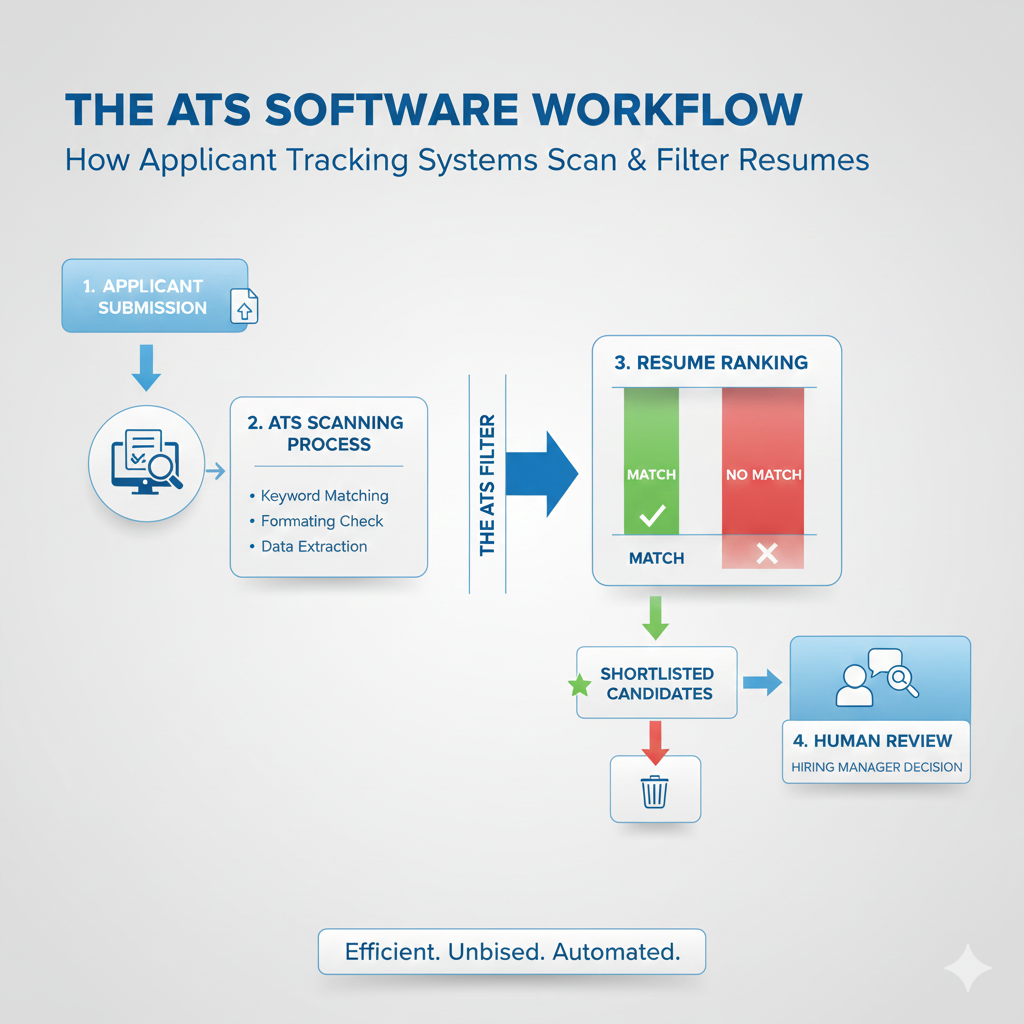
When you submit your resume, the ATS parsing engine:
- Reads your document: Converts your file into machine-readable text
- Identifies sections: Recognizes headers like Experience, Education, Skills
- Extracts data: Pulls out names, dates, job titles, companies, skills
- Categorizes information: Organizes extracted data into database fields
- Analyzes content: Evaluates relevance to job requirements
Keyword Matching Algorithms
Modern ATS platforms use sophisticated keyword matching:
Exact Match: Finds precise keyword matches between your resume and job description
Semantic Matching: Understands related terms and synonyms (AI-powered systems)
Contextual Analysis: Evaluates keywords within context, not just presence
Frequency Analysis: Notes how often relevant terms appear
Recency Weighting: Considers when skills were used or certifications earned
Scoring and Ranking Systems
After parsing, the ATS assigns scores based on:
- Keyword density: Percentage of required keywords present
- Skills match: Alignment between your skills and job requirements
- Experience relevance: How closely your work history matches the role
- Education fit: Degree requirements and institutional prestige
- Location compatibility: Geographic match or remote work suitability
- Application completeness: Whether all required fields are filled
Candidates scoring above threshold percentages (typically 70-80%) advance to human review. Those below get filtered out automatically. ATS-friendly resume
AI Enhancements in 2025
Newer systems incorporate advanced AI capabilities:
Natural Language Processing (NLP): Better understanding of resume content and context
Predictive Analytics: Forecasting candidate success based on historical data
Bias Reduction Algorithms: Attempting to minimize discrimination in screening
Skill Inference: Deducing skills from job descriptions even when not explicitly stated
Career Trajectory Analysis: Evaluating career progression patterns
Understanding these technologies helps you write an ATS-friendly resume that succeeds with both traditional and AI-enhanced systems.
Step 1: Decode the Job Description Like a Pro
The Foundation of ATS Success
Before writing a single word, you must thoroughly analyze the job description. This step determines your entire keyword strategy and content focus.
Visit our website – EasyNaukri4U – India’s Leading Government Job Portal for the latest job listings and descriptions to practice your analysis skills. ATS-friendly resume
Identifying Primary Keywords
Primary keywords are non-negotiable requirements. Look for:
- Job title variations: “Marketing Manager,” “Marketing Director,” “Brand Manager”
- Required skills: Explicitly stated as “required” or “must have”
- Technical tools: Specific software, platforms, or technologies mentioned
- Certifications: Required credentials like PMP, CPA, AWS certified
- Industry terms: Jargon specific to the field or role
Example Analysis:
Job Description excerpt: “We seek a Senior Data Analyst with expertise in Python, SQL, and Tableau. The ideal candidate has 5+ years experience in business intelligence, data visualization, and statistical analysis. Experience with machine learning algorithms preferred.” ATS-friendly resume
Primary Keywords Identified:
- Senior Data Analyst
- Python
- SQL
- Tableau
- Business intelligence
- Data visualization
- Statistical analysis
- Machine learning
Identifying Secondary Keywords
Secondary keywords strengthen your application but aren’t mandatory:
- Preferred qualifications: Listed as “nice to have” or “preferred”
- Soft skills: Communication, leadership, teamwork mentioned
- Industry knowledge: Domain expertise in specific sectors
- Methodologies: Agile, Scrum, Six Sigma, Lean
- Additional tools: Secondary software or platforms mentioned
Creating Your Keyword Map
Organize identified keywords into categories:
| Category | Primary Keywords | Secondary Keywords |
|---|---|---|
| Job Titles | Senior Data Analyst, Data Analyst | BI Analyst, Analytics Lead |
| Technical Skills | Python, SQL, Tableau | R, Power BI, Excel |
| Concepts | Data visualization, Statistical analysis | Predictive modeling, ETL |
| Soft Skills | – | Communication, Problem-solving |
| Certifications | – | Google Analytics certified |
This map guides your resume content and ensures comprehensive keyword coverage. ATS-friendly resume
Frequency Analysis
Count how many times important terms appear in the job description. Keywords mentioned multiple times deserve greater emphasis in your resume. A term appearing five times is more critical than one mentioned once. ATS-friendly resume
Understanding Intent
Beyond keywords, understand what the employer truly needs:
- Problems they’re solving: What challenges does this role address?
- Success metrics: How will performance be measured?
- Team dynamics: Who will you work with and report to?
- Growth expectations: Is this role expanding or maintaining?
This deeper understanding helps you craft compelling content that resonates with both ATS algorithms and human readers. ATS-friendly resume
Step 2: Choose the Right ATS-Friendly Resume Format
Format Fundamentals
The format you choose directly impacts ATS parsing success. Some formats that look beautiful to humans completely confuse automated systems. ATS-friendly resume
The Three Main Resume Formats
Chronological Format (Recommended for ATS)
Lists work experience in reverse chronological order. This format:
- Is easiest for ATS to parse correctly
- Shows clear career progression
- Works best for candidates with steady work history
- Is preferred by most recruiters and hiring managers
Functional Format (Use with Caution)
Organizes content by skills rather than timeline. This format:
- Can confuse ATS parsing engines
- May hide employment gaps but raises red flags
- Works poorly with most tracking systems
- Should generally be avoided for online applications
Hybrid/Combination Format (Good ATS Option)
Combines skills summary with chronological experience. This format:
- Balances skills showcase with clear timeline
- Works reasonably well with most ATS platforms
- Suits career changers and diverse experience backgrounds
- Requires careful structure to maintain ATS compatibility
ATS-Friendly Layout Guidelines
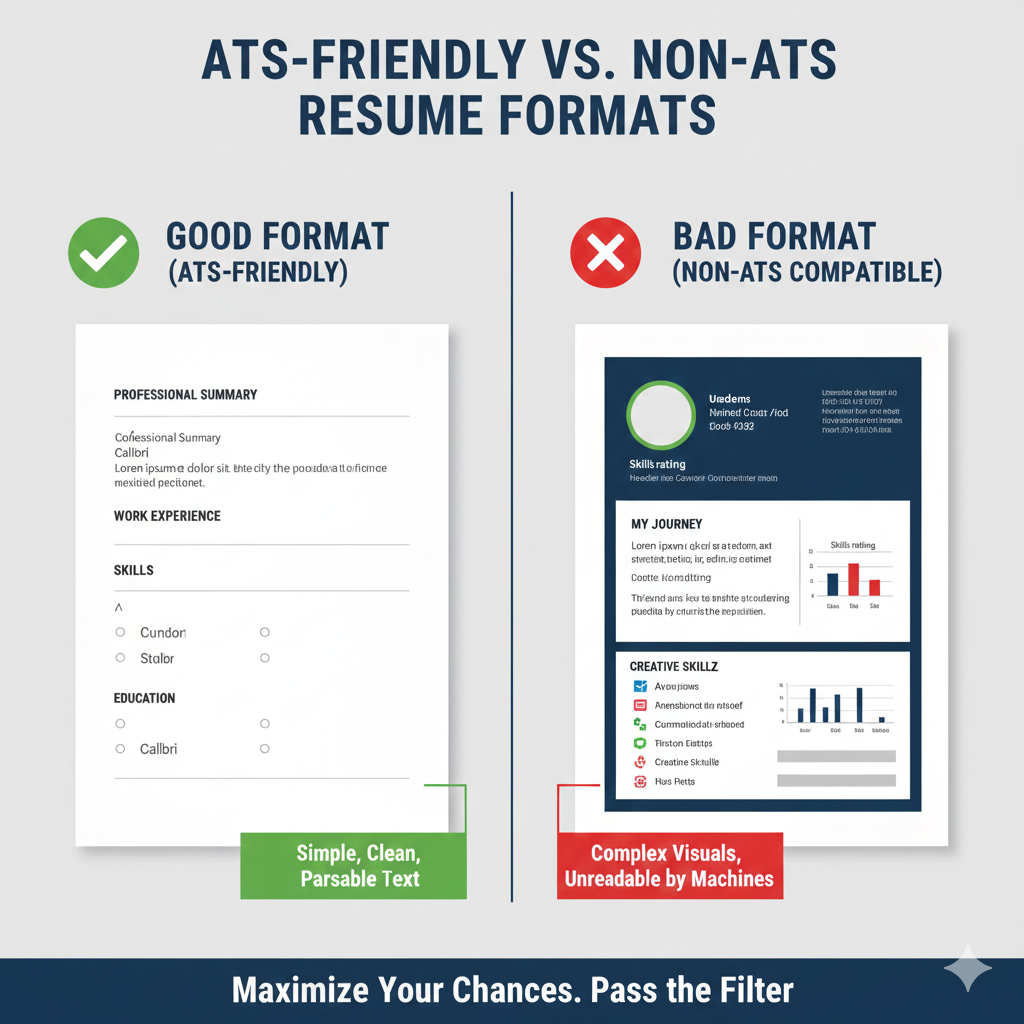
Use Standard Section Headers
ATS systems look for recognizable section names:
✅ Use These Headers:
- Professional Summary or Summary
- Work Experience or Experience
- Education
- Skills
- Certifications
- Projects
❌ Avoid Creative Headers:
- “My Journey” instead of Work Experience
- “Expertise Arsenal” instead of Skills
- “Knowledge Base” instead of Education
- “Achievements Unlocked” instead of Accomplishments
Single Column Layout
Multi-column layouts confuse ATS parsing. Information in side columns often gets:
- Ignored completely
- Merged incorrectly with other sections
- Scrambled into unreadable text
Stick to a single-column format for maximum compatibility.
Consistent Formatting
Maintain uniformity throughout:
- Same font throughout the document
- Consistent heading sizes and styles
- Uniform date formatting (MM/YYYY or Month YYYY)
- Aligned bullet points and margins
- Standard spacing between sections
Font Selection for ATS
Choose fonts that ATS systems read accurately:
✅ ATS-Safe Fonts:
- Arial
- Calibri
- Cambria
- Georgia
- Helvetica
- Times New Roman
- Verdana
- Garamond
❌ Avoid These Fonts:
- Script fonts (Brush Script, Lucida Handwriting)
- Decorative fonts (Impact, Comic Sans)
- Custom or unusual fonts
- Fonts with special characters
Use 10-12 point size for body text and 12-14 point for headers.
Margin and Spacing Guidelines
- Margins: 0.5 to 1 inch on all sides
- Line spacing: 1.0 to 1.15 for body text
- Section spacing: Add clear breaks between sections
- Bullet spacing: Consistent indentation for all bullets
Step 3: Master Resume Keywords Strategy
The Science of Keyword Optimization
Understanding how to write an ATS-friendly resume requires mastering keyword strategy. Keywords bridge the gap between your qualifications and employer requirements. ATS-friendly resume
Types of Resume Keywords
Hard Skills Keywords
Technical abilities and measurable competencies:
- Programming languages: Python, Java, JavaScript, C++
- Software tools: Salesforce, SAP, Adobe Creative Suite
- Technical processes: Data analysis, Financial modeling, UX design
- Industry knowledge: GAAP accounting, HIPAA compliance, Agile methodology
Soft Skills Keywords
Interpersonal and transferable abilities:
- Leadership and management
- Communication and presentation
- Problem-solving and critical thinking
- Teamwork and collaboration
- Adaptability and flexibility
- Time management and organization
Action Verb Keywords
Dynamic words that demonstrate impact:
- Achieved, Accomplished, Accelerated
- Built, Created, Developed, Designed
- Implemented, Increased, Improved
- Led, Managed, Mentored, Motivated
- Reduced, Resolved, Streamlined
- Spearheaded, Transformed, Upgraded
Industry-Specific Keywords
Terminology unique to your field:
- Healthcare: EHR, patient outcomes, clinical protocols
- Finance: ROI, portfolio management, risk assessment
- Technology: API integration, cloud architecture, DevOps
- Marketing: SEO, conversion rate, brand awareness
Keyword Placement Strategy
Strategic Locations for Keywords
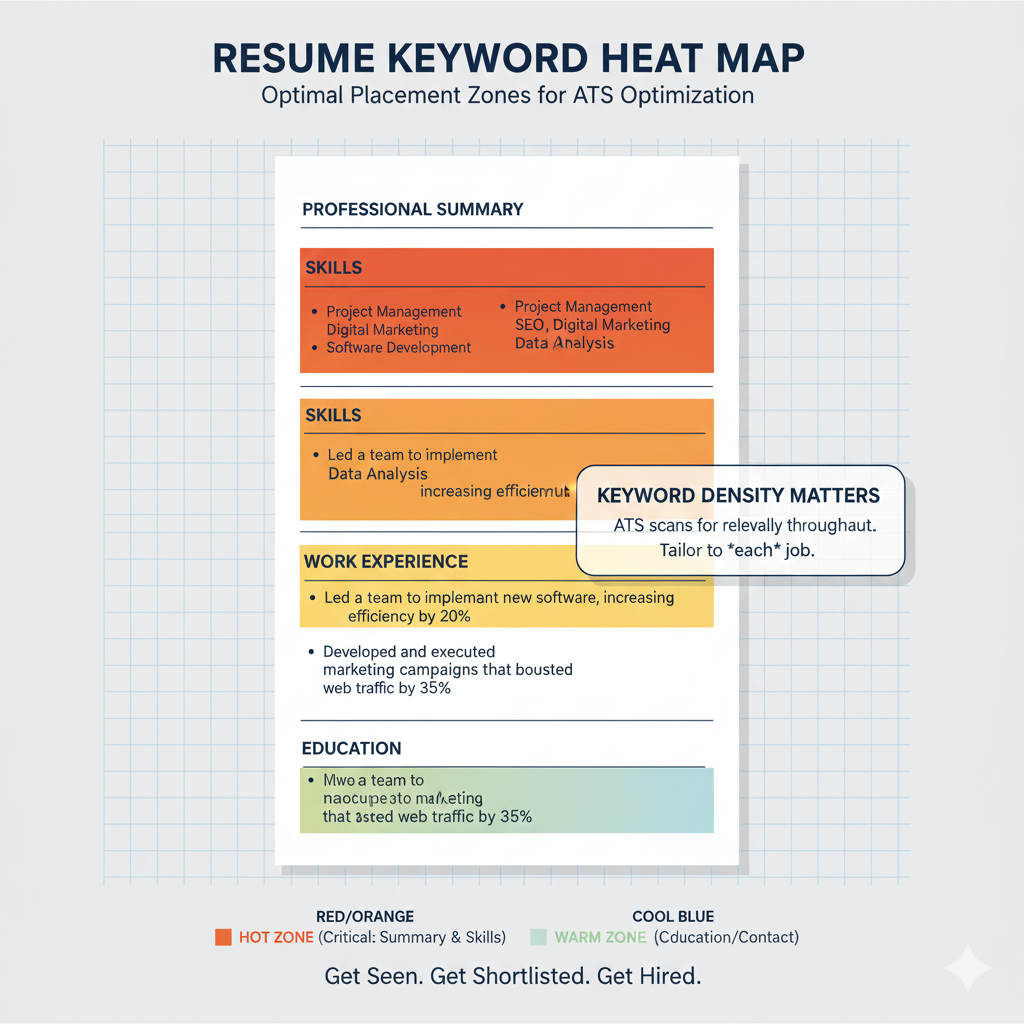
Keywords carry different weight depending on placement:
- Professional Summary: High-impact location—include top 3-5 keywords
- Job Titles: Match titles when honest and appropriate
- Skills Section: Dedicated keyword-rich section
- Work Experience: Natural integration within achievements
- Education/Certifications: Include relevant credentials
Natural Integration Techniques
Avoid keyword stuffing by integrating naturally:
❌ Keyword Stuffing (Bad):
“Project management project manager managing projects with project management software for project management excellence.”
✅ Natural Integration (Good):
“Led cross-functional project management initiatives using Asana and Jira, delivering 15 projects on time and 10% under budget.” ATS-friendly resume
Keyword Variations and Synonyms
Include variations to capture different ATS searches:
- Project Management: Project Manager, PM, Program Management
- Customer Service: Client Relations, Customer Success, Customer Support
- Financial Analysis: Financial Analyst, Finance Analysis, Financial Modeling
- Human Resources: HR, People Operations, Talent Management
Acronyms and Full Terms
Include both acronyms and spelled-out versions:
- “Search Engine Optimization (SEO)”
- “Customer Relationship Management (CRM)”
- “Key Performance Indicators (KPIs)”
- “Return on Investment (ROI)”
This ensures ATS catches your keywords regardless of search format.
Keyword Density Guidelines
- Skills section: High density acceptable—list format expected
- Summary: 3-5 primary keywords naturally integrated
- Experience bullets: 1-2 keywords per bullet point
- Overall: Aim for 2-3% keyword density without forcing
Step 4: Write Each Section for Maximum ATS Score
Professional Summary Section
Your summary is prime real estate for keywords and impact. Write 3-5 sentences that:
- State your professional identity and experience level
- Highlight top relevant skills and expertise
- Include measurable achievements
- Incorporate 3-5 primary keywords naturally
ATS-Optimized Summary Example:
“Results-driven Digital Marketing Manager with 7+ years of experience driving brand awareness and revenue growth through data-driven marketing strategies. Expert in SEO, PPC advertising, Google Analytics, and marketing automation platforms including HubSpot and Marketo. Proven track record of increasing organic traffic by 150% and generating $2M+ in qualified leads annually. Skilled in cross-functional team leadership and strategic campaign development.” ATS-friendly resume
Keyword Analysis:
- Digital Marketing Manager (job title)
- SEO, PPC, Google Analytics (technical skills)
- HubSpot, Marketo (specific tools)
- Marketing automation, brand awareness (industry terms)
- Team leadership, strategic (soft skills)
Work Experience Section
Experience is where you demonstrate keyword relevance through achievements.
Formatting Work Experience:
textJob Title
Company Name | City, State | MM/YYYY – MM/YYYY

• Achievement bullet with keyword and quantified result
• Achievement bullet with keyword and quantified result
• Achievement bullet with keyword and quantified result
Writing ATS-Friendly Bullet Points
Use the CAR formula: Challenge, Action, Result
❌ Weak Bullet:
“Responsible for managing social media accounts”
✅ Strong Bullet:
“Managed social media strategy across 5 platforms, increasing follower engagement by 200% and driving 45% more website traffic through targeted content marketing campaigns” ATS-friendly resume
Keyword Integration Examples:
For a Software Developer position:
- “Developed Python-based automation scripts that reduced data processing time by 60%, improving overall system efficiency”
- “Implemented RESTful APIs using Node.js and MongoDB, supporting 10,000+ daily active users”
- “Led Agile development sprints for cross-functional team of 8 developers, consistently delivering features 2 weeks ahead of schedule”
For a Sales Manager position:
- “Exceeded quarterly sales targets by 135% through strategic account management and consultative selling techniques”
- “Built and trained high-performing sales team of 12 representatives, reducing turnover by 40% through improved coaching and development programs”
- “Implemented Salesforce CRM optimization that improved lead conversion rates by 28% and shortened sales cycle by 15 days”
Skills Section Structure
Create a dedicated skills section that ATS can easily parse:
Technical Skills:
Python | SQL | Tableau | Power BI | Excel | Google Analytics | R | Machine Learning | Data Visualization | Statistical Analysis
Software & Tools:
Salesforce | HubSpot | Jira | Asana | Slack | Microsoft Office Suite | Adobe Creative Suite | SAP
Certifications:
Google Analytics Certified | AWS Solutions Architect | PMP Certified | Six Sigma Green Belt
Education Section
Format education for easy ATS parsing:
textDegree Name – Major
University Name | City, State | Graduation Year
• Relevant coursework: Course 1, Course 2, Course 3
• GPA: X.XX (if above 3.5)
• Honors: Dean's List, Magna Cum Laude
Include keywords in coursework listings and honors when relevant.
Certifications Section
List certifications with complete information:
textCertification Name | Issuing Organization | Year Earned
Examples:
- Project Management Professional (PMP) | Project Management Institute | 2024
- AWS Certified Solutions Architect | Amazon Web Services | 2024
- Google Analytics Individual Qualification | Google | 2025
Additional ATS-Friendly Sections
Projects Section:
textProject Name | Technologies Used | Date
• Description with keywords and outcomes
Volunteer Experience:
textRole Title | Organization Name | Dates
• Achievement with relevant skills demonstrated
Publications/Presentations:
- Include if relevant to target role
- Use industry keywords in titles and descriptions
Step 5: Avoid Common ATS Resume Mistakes
Formatting Errors That Kill Applications
Tables and Text Boxes
ATS systems struggle with tables and text boxes:
- Information may be extracted out of order
- Content inside boxes might be ignored entirely
- Table cells create parsing confusion
Solution: Use standard text formatting with clear line breaks instead.
Headers and Footers
Many ATS platforms cannot read document headers and footers:
- Contact information in headers may be missed
- Page numbers in footers cause confusion
Solution: Place all essential information in the main document body.
Graphics and Images
Visual elements are invisible to ATS:
- Logos and icons won’t be parsed
- Infographics with key information get ignored
- Photos take up space without adding value
Solution: Use only text-based content for ATS submissions.
Columns and Complex Layouts
Multi-column designs cause parsing errors:
- Text from different columns may merge incorrectly
- Reading order becomes unpredictable
- Section boundaries get confused
Solution: Stick to single-column, top-to-bottom layouts.
Content Mistakes to Avoid
Keyword Stuffing
Overloading with keywords backfires:
- Modern AI detects unnatural patterns
- Human reviewers reject obvious stuffing
- May trigger spam filters
Solution: Integrate keywords naturally within context.
Missing Keywords
Failing to include essential terms:
- Using only synonyms without exact matches
- Assuming skills are implied rather than stated
- Forgetting industry-specific terminology
Solution: Include both exact keywords and natural variations.
Generic Content
One-size-fits-all resumes underperform:
- Miss job-specific keywords
- Fail to demonstrate role relevance
- Don’t address employer needs
Solution: Tailor each resume for specific positions.
Inconsistent Information
Mismatched details raise red flags:
- Different job titles on resume vs. LinkedIn
- Inconsistent date formats throughout
- Varying company name presentations
Solution: Maintain consistency across all applications and profiles.
Technical Submission Errors
Wrong File Format
Incompatible formats cause parsing failures:
- Image-based PDFs can’t be read
- Unusual file types may not open
- Corrupted files get rejected automatically
Solution: Submit text-based PDF or DOCX files as requested.
Filename Issues
Poor filenames create problems:
- Generic names like “Resume.pdf” get lost
- Special characters may cause errors
- Excessively long names get truncated
Solution: Use format: “FirstName_LastName_Resume.pdf”
Missing Application Fields
Incomplete submissions hurt rankings:
- Empty optional fields lower scores
- Skipped questions raise concerns
- Incomplete profiles seem unprofessional
Solution: Complete all application fields thoroughly.
Step 6: Optimize File Format and Submission
Choosing the Right File Format
PDF vs. DOCX: The Ongoing Debate
Both formats have advantages for ATS submission:
PDF Advantages:
- Preserves formatting across devices
- Prevents accidental editing
- Looks professional and polished
- Most modern ATS parse PDFs well
PDF Disadvantages:
- Some older ATS struggle with PDFs
- Image-based PDFs fail completely
- Complex PDF formatting can confuse parsers
DOCX Advantages:
- Highest ATS compatibility
- Easy for recruiters to edit/annotate
- Simple formatting parses reliably
- Preferred by many older systems
DOCX Disadvantages:
- Formatting may shift between devices
- Fonts may not display correctly
- Less professional appearance sometimes
Best Practice: Check job posting instructions. If no preference stated, DOCX offers maximum compatibility. For design-conscious roles, PDF works well if text-based.
Creating ATS-Compatible PDFs
If submitting PDF:
- Create document in Word or Google Docs first
- Use simple, consistent formatting
- Export/Save as PDF (not print to PDF)
- Test by copying text from PDF to plain text editor
- If text copies cleanly, PDF is ATS-compatible
File Naming Conventions
Professional file names improve organization and impression:
✅ Good File Names:
- John_Smith_Resume.pdf
- JohnSmith_Marketing_Manager_Resume.docx
- Smith_John_Application_CompanyName.pdf
❌ Poor File Names:
- Resume_Final_v3_FINAL.pdf
- my resume.docx
- document1.pdf
- resume (1).docx
Submission Best Practices
Direct Application:
- Follow all instructions exactly
- Complete every form field
- Upload resume in requested format
- Include cover letter if requested
Email Application:
- Use professional subject line
- Attach resume (don’t paste in body)
- Brief, professional email body
- Include all requested materials
LinkedIn Easy Apply:
- Ensure LinkedIn profile matches resume
- Upload custom resume rather than using LinkedIn version
- Complete all additional questions
Step 7: Test Your Resume Before Applying
ATS Testing Tools
Before submitting applications, test your resume’s ATS compatibility:
Free Testing Options:
Jobscan (Limited Free)
- Compares resume against job descriptions
- Shows keyword match percentage
- Identifies missing skills and terms
- Provides formatting feedback
Resume Worded (Limited Free)
- Analyzes content quality
- Suggests improvements
- Scores resume effectiveness
- Checks ATS compatibility
TopResume Free Review
- Professional resume review
- ATS compatibility check
- Improvement suggestions
Visit our resume builder – Government Jobs – EasyNaukri4U for tools to create and test your resume.
Manual Testing Methods
Plain Text Test:
- Copy entire resume content
- Paste into plain text editor (Notepad)
- Check if information flows logically
- Verify no content is missing or jumbled
- Ensure sections remain organized
ATS Simulation:
- Submit resume to your own email
- Open and review how it appears
- Check all content is present and readable
- Verify formatting survived transmission
Keyword Match Testing
Manual Keyword Analysis:
- Highlight keywords in job description
- Search for each keyword in your resume
- Calculate percentage of keywords included
- Add missing critical keywords naturally
Target Scores:
- Aim for 70%+ keyword match minimum
- 80%+ significantly improves chances
- 90%+ maximizes ATS passage rates
Readability Testing
Ensure human readers also appreciate your resume:
- Read aloud: Catches awkward phrasing
- Peer review: Fresh eyes spot issues
- Print test: Check physical appearance
- Mobile view: Many recruiters review on phones
Step 8: Industry-Specific ATS Optimization
Technology and IT Resumes
Tech companies often use sophisticated ATS with AI enhancement.
Key Optimization Strategies:
Technical Skills Emphasis:
- List programming languages with proficiency levels
- Include frameworks, libraries, and tools
- Mention cloud platforms and services
- Add database and infrastructure experience
Project Quantification:
- Lines of code or commits contributed
- System performance improvements
- User impact metrics
- Deployment and release numbers
Essential Keywords:
- Agile, Scrum, DevOps, CI/CD
- AWS, Azure, Google Cloud
- Python, JavaScript, Java, Go
- Docker, Kubernetes, Microservices
- Machine Learning, AI, Data Science
Example Bullet:
“Architected microservices infrastructure using Docker and Kubernetes on AWS, reducing deployment time by 75% and improving system uptime to 99.99%”
Healthcare Industry Resumes
Healthcare ATS prioritizes compliance and certifications.
Key Optimization Strategies:
Credentials First:
- List all licenses with numbers and states
- Include certifications prominently
- Note continuing education credits
- Highlight compliance training
Patient-Centered Metrics:
- Patient satisfaction scores
- Care quality improvements
- Safety incident reductions
- Efficiency and throughput gains
Essential Keywords:
- HIPAA compliance, EHR, EMR
- Patient care, Clinical outcomes
- Epic, Cerner, Meditech
- ICD-10, CPT coding
- Joint Commission, CMS
Example Bullet:
“Implemented evidence-based patient care protocols using Epic EHR system, improving patient satisfaction scores by 23% and reducing readmission rates by 15%”
Finance and Accounting Resumes
Financial sector ATS emphasizes precision and compliance.
Key Optimization Strategies:
Certification Prominence:
- CPA, CFA, CFP credentials
- Series licenses for financial services
- Anti-money laundering certifications
- Continuing professional education
Quantified Financial Impact:
- Dollar amounts managed or influenced
- Percentage improvements in metrics
- Audit findings or compliance rates
- Cost savings achieved
Essential Keywords:
- GAAP, IFRS, SOX compliance
- Financial modeling, Forecasting
- QuickBooks, SAP, Oracle Financials
- Risk assessment, Due diligence
- Budgeting, Variance analysis
Example Bullet:
“Managed $50M investment portfolio achieving 12% annual returns, outperforming benchmark by 3% while maintaining full SOX compliance”
Marketing and Creative Resumes
Marketing ATS balances creativity with data-driven results.
Key Optimization Strategies:
Platform Proficiency:
- List marketing automation tools
- Include analytics platforms
- Note social media expertise
- Add content management systems
Campaign Metrics:
- ROI and ROAS figures
- Conversion rate improvements
- Traffic and engagement growth
- Lead generation numbers
Essential Keywords:
- SEO, SEM, PPC, Content Marketing
- Google Analytics, HubSpot, Marketo
- Social media marketing, Influencer marketing
- Brand awareness, Lead generation
- A/B testing, Conversion optimization
Example Bullet:
“Developed omnichannel digital marketing strategy using HubSpot and Google Analytics, increasing qualified leads by 180% and reducing cost per acquisition by 45%”
Sales and Business Development Resumes
Sales ATS focuses on revenue impact and relationship building.
Key Optimization Strategies:
Revenue Emphasis:
- Quota achievement percentages
- Deal sizes and total revenue
- Client retention and growth
- Pipeline value managed
Relationship Metrics:
- Accounts managed or developed
- Client satisfaction scores
- Referral rates generated
- Partnership deals closed
Essential Keywords:
- Salesforce, HubSpot CRM
- B2B, B2C, Enterprise sales
- Account management, Business development
- Negotiation, Consultative selling
- Pipeline management, Forecasting
Example Bullet:
“Exceeded annual quota by 145% generating $3.2M in new business revenue through consultative B2B sales approach and strategic account development”
Step 9: Balance ATS Optimization with Human Appeal
The Dual-Audience Challenge
Your resume must satisfy two very different readers:
ATS Requirements:
- Keyword presence and density
- Parseable formatting
- Standard structure
- Complete information
Human Requirements:
- Compelling narrative
- Visual appeal
- Authentic voice
- Memorable impact
Writing for Both Audiences
Lead with Impact, Include Keywords:
Instead of keyword-first writing:
❌ “SEO specialist with SEO experience in SEO strategy”
Write human-first with keywords:
✅ “Digital marketing specialist who increased organic search visibility by 200% through comprehensive SEO strategy and content optimization”
Tell Stories with Data:
Humans remember stories. ATS needs data. Combine both:
“When our e-commerce conversion rate plateaued, I analyzed user behavior data using Google Analytics and Hotjar, identified checkout friction points, and implemented UX improvements that increased conversions by 35% within 90 days.”
This tells a compelling story while including keywords: e-commerce, conversion rate, Google Analytics, Hotjar, UX, data analysis.
Visual Hierarchy Without Graphics
Create visual appeal using ATS-safe formatting:
- Strategic white space: Let content breathe
- Bold key terms: Draw attention to important words
- Consistent structure: Create predictable reading flow
- Clear section breaks: Organize information logically
Voice and Personality
Inject personality while maintaining professionalism:
- Use strong action verbs that reflect your style
- Include industry-appropriate terminology
- Show enthusiasm through achievement descriptions
- Let accomplishments speak to your character
Step 10: Advanced ATS Strategies for 2025
Leveraging AI in Your Job Search
AI isn’t just in ATS—use it to your advantage:
AI Resume Writing Assistants:
- ChatGPT for brainstorming bullet points
- Claude for content refinement
- Jasper for marketing-focused content
- Copy.ai for achievement descriptions
Important: Always personalize AI-generated content. Generic AI output is detectable and less effective.
LinkedIn Profile Synchronization
Many ATS platforms pull LinkedIn data:
Alignment Checklist:
- Job titles match between resume and LinkedIn
- Company names are identical
- Dates are consistent
- Skills sections overlap significantly
- Summary themes align
LinkedIn Optimization:
- Use keywords in headline and summary
- Complete all profile sections
- Add relevant skills for endorsements
- Include media and projects when possible
Application Tracking and Follow-up
Organize your job search for better results:
Track These Details:
- Company and position
- Application date and method
- Keywords emphasized
- Resume version used
- Follow-up dates and responses
Follow-up Strategy:
- Wait 1-2 weeks after application
- Reference specific job and date
- Add new relevant information if possible
- Express continued interest professionally
Networking Beyond ATS
Sometimes the best strategy bypasses ATS entirely:
Referral Applications:
- Employee referrals often skip initial ATS screening
- Build genuine professional relationships
- Engage thoughtfully on LinkedIn
- Attend industry events and conferences
Direct Outreach:
- Connect with hiring managers professionally
- Share relevant insights or content
- Express interest in their work
- Request informational conversations
Continuous Resume Evolution
Your resume should evolve constantly:
Regular Updates:
- Add new achievements quarterly
- Update skills as you develop them
- Refresh certifications when earned
- Modify summary as goals change
Version Management:
- Maintain master resume with all content
- Create tailored versions for different role types
- Track which versions produce results
- Continuously improve based on feedback
Free ATS Resume Tools and Resources
Resume Building Platforms
Free Options:
- Google Docs: ATS-friendly templates available
- Canva Free: Basic templates, use simple designs
- Indeed Resume Builder: Free, ATS-optimized
- LinkedIn Resume Builder: Creates from profile
Visit our resume builder – Government Jobs – EasyNaukri4U for specialized resume building tools.
ATS Testing and Optimization
Free Tools:
- Jobscan: 5 free scans per month
- Resume Worded: Free basic analysis
- VMock: Free for some universities
- SkillSyncer: Free limited version
Learning Resources
Free Courses and Guides:
- LinkedIn Learning (free trial)
- Coursera career development courses
- YouTube resume tutorials
- Industry-specific blogs and guides
Job Search Platforms
Government and Public Sector:
Visit our website – EasyNaukri4U – India’s Leading Government Job Portal for the latest government job opportunities.
General Platforms:
- LinkedIn Jobs
- Indeed
- Glassdoor
- Monster
Conclusion: Your ATS-Friendly Resume Action Plan
Mastering how to write an ATS-friendly resume is essential for job search success in 2025. The strategies in this guide give you significant advantages over candidates who ignore ATS optimization.
Your Action Plan Summary
Immediate Actions:
- Analyze your target job descriptions for keywords
- Audit your current resume for ATS compatibility
- Reformat using ATS-safe structure and fonts
- Integrate keywords naturally throughout
Short-Term Actions:
- Test your resume with ATS scanning tools
- Create tailored versions for different role types
- Update LinkedIn profile for consistency
- Build a tracking system for applications
Ongoing Actions:
- Continuously update with new achievements
- Refine based on application results
- Stay current with ATS technology changes
- Network beyond automated systems
Final Thoughts
Remember that ATS optimization is a means to an end—getting your resume in front of human decision-makers. The best resumes satisfy algorithmic requirements while compelling human readers to take action.
Your resume represents your professional story. Make it one that both machines can read and humans want to hear. With the strategies in this guide, you’re equipped to navigate the 2025 job market successfully.
Start optimizing your resume today, and open doors to the career opportunities you deserve.
Ready to create your ATS-friendly resume?
Visit our website – EasyNaukri4U – India’s Leading Government Job Portal
Visit our resume builder – Government Jobs – EasyNaukri4U