How to Create a Professional Resume That Wins in 2025
BlogIntroduction
how to create a professional resume?
In 2025, the job market is more fierce than ever. Every year, millions of professionals apply to roles and recruiters tend to look at each resume for a matter of seconds. In this climate, a compelling, professional resume is more than a piece of paper — it is your first impression, your marketing tool and the key to getting interviews.
A professional resume today has to convey clarity, punch, and be machine-readable as well. Many firms have also introduced Applicant Tracking System (ATS) or AI-based screening solutions to filter the resumes before it reaches a human, thus adding more layers of complexity.
visit our website – EasyNaukri4U – India’s Leading Government Job Portal
visit our resume builder – Government Jobs - EasyNaukri4U
“According to LinkedIn’s Global Talent Trends Report, recruiters spend an average of six to seven seconds reviewing each resume.”
That means a resume now has to impress not just humans, but machines as well. This step by-step guide will show you how to create a resume that gets noticed in 2025. We provide guidance on everything from which format you should choose, to how you should write bullet points that highlight your achievements, and more, so that you can have a resume that wins.
Step 1: Get to Know What Employers and Their Systems Look for
The first step to writing a good resume is to realize what recruiters and system are expecting man from you. Relevance of content Among the candidates relevance of content is one major mistake they forget while focussing on the design or length of Resumes.
Review the Job Description Analyze
The Job Description Every job description has a hidden message about what the employer really wants. Scrutinize the armamentarium of skills, qualities, and duties. Scan for “buzz words” that seem to appear several times — they’re usually the most important qualifications. For instance, if the listing for a software developer position regularly features “Python,” “data structures,” and “cloud computing,” these are relevant keywords that you should definitely use on your resume. how to create a professional resume
Incorporating these keywords contribute to getting your resume through ATS filters and also show recruiters that you have the skills they need to buy. You need to tailor your resume for each job you apply for anyway these days generic resumes don’t tend to go far. how to create a professional resume
Focus on accomplishments, not duties
Listing job duties is an error.) Job Achievements of what you do instead of Listing your duties. Measurable numbers make your work experience concrete. For instance:
Weak: “Responsible for managing a sales team.”
Strong: “Oversaw a team of eight sales associates and four customer service representatives to boost quarterly sales revenue by 25%.”
Quantifying your achievements shows impact and helps make your resume stand out. Wherever you can use them, use figures like percentages, numbers or timelines.
Highlight Skills that are Relevant
What employers are really after, when skimming, are relevant hard and soft skills. Hard skills are technical skills—for example, coding, data analysis, project management. Soft skills, such as leadership, communication, and problem-solving. Both are important, but it’s about relevance. Make sure the skills that you have listed on your resume match those in the job description.
Step 2: Select an Appropriate Resume Format
how to create a professional resume???
The layout of your resume can impact on how Is perceived and whether or not it’s able to make it through ATS software.
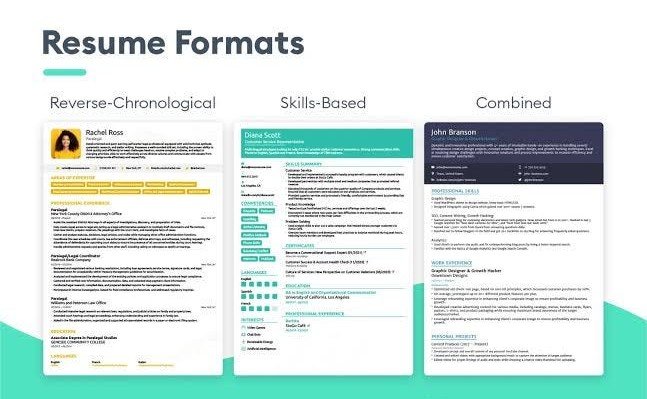
Chronological, Functional or Hybrid?
The chronological resume presents a candidate’s work experience in reverse chronological order. This format is best for people with a steady career path. Functional resumes are skill-based, not work history based. They work well for career changers, or people who have gaps in employment.
A hybrid resume is a skill and experience based resume, where you can focus on skill highlights to showcase accomplishments while still providing a clear work timeline.
Select the format that suits your career level and the role you want.
Clean It up and Make it Professional
There is nothing more critical than a clean and readable format. Use common fonts such as Arial or Calibri with the size of the font being 10 to 12 points. Use uniform headings and proper spacing. Avoid clutter, fancy graphics, and tables that could interfere with ATS processing.
Professional formatting is also an issue when it comes to the file type! Save your resume in a PDF or DOCX file (text-based). Don’t submit image-based PDFs or other non-standard formats that an ATS can’t read. how to create a professional resume
Step 3: Write Each Section with Care
Header and Contact Details

Your header should contain your full name, a professional email address, and optionally a LinkedIn profile or personal portfolio URL. Steer clear of pointless personal information such as marital status, date of birth or have a photo on your CV unless you are asked to.
Professional Summary or Objective
what to include in a professional summary is A good professional summary is a 3-4 lines of short paragraph that talks about your work experience, skills and what makes unique sporty to job. Customize it for each job application. for example:
“Marketing Analyst Results-oriented marketing analyst with a summary of 5+ years of experience in data analysis of digital campaigns and increasing ROI. Experienced in Google
Analytics, SEO and content marketing. Demonstrate quantifiable impact to enhance your brand awareness.”
This section allows you to immediately the recruiters know why you’re qualified. Experience
Experience is the heart of your resume. Use accomplishments as bullet points, beginning with action verbs such as “led,” “implemented,” or “deemed.”
Write each one in STAR format: Situation, Task, Action, Result Rather than saying, Terry took you a long way from where you were, describe specifically what actions he took! Adapted from Several examples of STAR formatted answers: “I restructured the training protocol (Situation/Task) and introduced an organized syllabus (Action) which led to a 40% decrease in training time and a better-trained employee (Result).” how to create a professional resume
List your experiences in reverse-chronological order, most recent and relevant first. Education and Certifications
Prioritize your qualifications that are most pertinent first. Degrees, certifications and any honors or projects of note. In the case of more technical positions, listing recent or industry recognized certifications can also set you apart.
Skills Section
Separate your skills into hard and soft skills:
Hard skills: Programming languages, software, hardware, tools, or processes. Soft skills: Leadership, communication, critical thinking.
Do not just copy and paste every single skill from the job description- tailor your skills according to those outlined in the description. Be more rigorous about what you can prove. Question- how to create a professional resume
Step 4: Optimize for Applicant Tracking Systems (ATS)
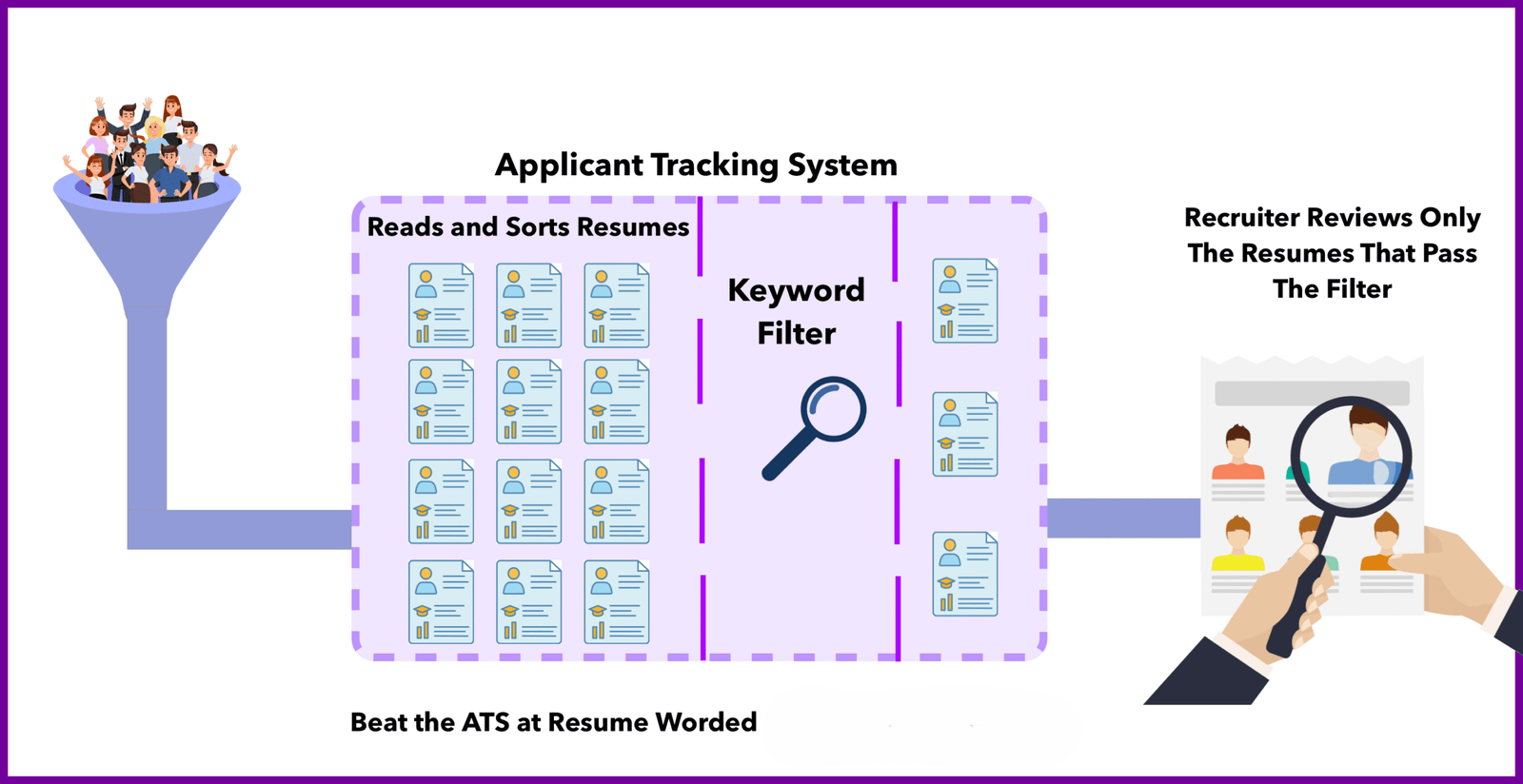
These days, your resume will be scanned by ATS software before a human takes a peek. Making your resume ATS-friendly is crucial to get noticed.
Use Standard Headings
Standard headings like “Work Experience,” “Education,” and “Skills” will assist the ATS in recognizing the different sections of your application. Don’t use creative substitutes such as “Where I’ve Worked” or “Stuff I Know” because ATS can have issues with them. how to create a professional resume
Incorporate Keywords Naturally
Use the job description keywords naturally in your bullet points, summary, and skills section. But don’t overload your content with keywords — you don’t to make it look unnatural or be hard to read.
Avoid Complex Formatting
Complex formats such as tables, images, charts, and columns can interrupt ATS software. Use a one-column, text-based template for the best ATS compatibility. how to create a professional resume
Look For Compatibility
Test your resume by pasting it in a text-only editor before applying. If it’s readable, it’s probably ATS-friendly.
Step 5: Polish, Proofread, and Receive Feedback
Even the best content is sabotaged by typos and poor grammar. Proofread your resume several times and say it out loud to catch awkward sentences.
Ask mentors, friends or colleagues to read over your resume. A pair of fresh eyes may notice inconsistencies or offer suggestions. You can also run your text through grammar and style checkers available online, but beware: these are no substitutes for human assessment.
Step 6: Prevent the most frequently seen mistakes on resumes
how to create a professional resume???
Many good resume’s authors make the same errors that limit their potential to be selected. Here’s what to avoid:
Generic resumes: You have to tailor every job.
Unclear statements: Change “Responsible for managing projects” to outcomes you can quantify.
Resumes that are too lengthy: Restrict to 1-2 pages for most professionals; 3 pages only if your expertise justifies it.
Excessive AI: Use AI to generate drafts, but don’t depend on it too much or the content may end up too bland, or even wrong.
Not showing off remote-work skills: When relevant, “show them that you know how to use remote-work collaboration tools [and that] you can lead virtual teams.”
Best Practices for Writing a Resume in 2025
Make it short and sweet: Every bullet point should offer a clear and succinct explanation of value.
Write it like a story action + metric + result: It makes it easy to understand in one line what the impact is.
Stay current: Keep adding accomplishments and new skills to your resume even if you are not actively job hunting.
Customize AI-created content: When leveraging AI, make sure your tone and genuine accomplishments are evident.
Adjust for each application: Have a master resume but tweak it to fit the job description.
Examples of Strong Resume Content
Here are sample bullet points that demonstrate best practices:
Sales Role: “Increased the size of regional sales organization by 15%, encoding an extra cash flow of $500,000 in 1 year.”
Marketing Position: “Refined social media plan and raised interaction by 60% and leads by 30%.”
Technical Role: “Designed a machine learning algorithm that aligns 99% of spoken words with data processing time cut by 25%.”
These examples have action, measurable results, and are very clear, which is what recruiters (and ATS) want.
Just remember your resume is not a laundry list of jobs — it is your story, your worth, and your first impression. Follow these steps to write a resume that’s impactful, modern, human– and more likely to catch an eye in today is crazy competitive job market.
Step 7: Leverage Modern Resume Tools and Templates
In 2025, knowing how to create a professional resume means understanding the tools available to you. Modern resume builders and templates can save time while ensuring your document looks polished and professional.
Online Resume Builders
Several online platforms offer free and premium resume building tools. Websites like Canva, Resume.io, Zety, and Novoresume provide professionally designed templates that are both visually appealing and ATS-compatible. These tools guide you through each section, ensuring you don’t miss important details.
When selecting a resume builder, look for platforms that offer ATS-friendly templates, customization options, and easy export features. Many builders also provide real-time feedback on your content, helping you optimize your resume as you write.
Free vs Premium Templates
Free templates work well for entry-level positions and basic roles. However, premium templates often include advanced formatting options, multiple color schemes, and industry-specific designs. If you’re applying for executive positions or creative roles, investing in a premium template might be worthwhile.
Remember that the best template is one that presents your information clearly. Fancy designs might impress humans but can confuse ATS software. Always prioritize readability and compatibility over aesthetics.
AI-Powered Resume Tools
Artificial intelligence has transformed how professionals create resumes. AI-powered tools can analyze job descriptions, suggest relevant keywords, and even write bullet points based on your input. Tools like Jobscan, Skillsyncer, and Resume Worded help optimize your resume for specific job postings.
However, use AI tools as assistants, not replacements. Always review and personalize AI-generated content to ensure it accurately reflects your experience and achievements. Generic AI content can make your resume sound robotic and impersonal.
Step 8: Tailor Your Resume for Different Industries
Understanding how to create a professional resume also means knowing that different industries have different expectations. A resume for a creative agency looks different from one for a financial institution.
Technology and IT Resumes
Tech resumes should emphasize technical skills, programming languages, certifications, and project experience. Include a dedicated technical skills section listing languages, frameworks, tools, and platforms you’ve mastered. Highlight contributions to open-source projects, GitHub repositories, or technical blogs.
For software developers, include metrics like code efficiency improvements, bug reduction rates, or successful product launches. Certifications from AWS, Google, Microsoft, or Cisco add significant value to IT resumes.
Healthcare and Medical Resumes
Healthcare resumes require specific formatting and content. Include licenses, certifications, clinical rotations, and specialized training prominently. Patient care metrics, compliance records, and continuing education credits demonstrate professional commitment.
Medical professionals should also highlight experience with electronic health records (EHR) systems, HIPAA compliance knowledge, and any specialized procedures or equipment proficiency.
Finance and Accounting Resumes
Financial sector resumes should showcase analytical skills, regulatory knowledge, and quantifiable achievements. Include certifications like CPA, CFA, or CFP prominently. Highlight experience with financial software, reporting tools, and compliance frameworks.
Use metrics like portfolio growth percentages, cost savings achieved, audit accuracy rates, or revenue increases to demonstrate your impact.
Creative and Marketing Resumes
Creative professionals can take more design liberties while maintaining ATS compatibility. Include links to portfolios, campaigns you’ve managed, or creative projects. Metrics like engagement rates, conversion improvements, brand awareness increases, or campaign ROI demonstrate marketing effectiveness.
For designers, include software proficiency in Adobe Creative Suite, Figma, Sketch, or other industry tools. Writers should mention content management systems, SEO tools, and analytics platforms.
Sales and Business Development Resumes
Sales resumes should be numbers-driven. Include quota achievement percentages, revenue generated, deals closed, and client retention rates. Highlight CRM proficiency, particularly with Salesforce, HubSpot, or similar platforms.
Demonstrate relationship-building skills through client testimonials, partnership development, or territory expansion achievements.
I you Still Have Doubt – how to create a professional resume?? how to create a professional resume??
Step 9: Include Essential Resume Sections for 2025
Modern resumes benefit from additional sections that showcase your complete professional profile. Learning how to create a professional resume means knowing which optional sections add value.
Certifications and Professional Development
In 2025, continuous learning matters more than ever. Include relevant certifications, online courses, workshops, and training programs. Platforms like Coursera, LinkedIn Learning, Udemy, and edX offer recognized certifications that employers value.
List certifications with issuing organizations and dates. Prioritize industry-recognized credentials over generic courses. Recent certifications show commitment to staying current in your field.
Volunteer Experience and Community Involvement
Volunteer work demonstrates character, leadership, and community commitment. Include relevant volunteer positions that showcase transferable skills. Leadership roles in nonprofit organizations, mentorship programs, or community initiatives add depth to your profile.
For career changers or recent graduates, volunteer experience can fill gaps and demonstrate practical skills.
Languages and International Experience
In our globalized economy, language skills and international experience are valuable assets. List languages with proficiency levels: native, fluent, conversational, or basic. Include study abroad programs, international work assignments, or cross-cultural projects.
Multilingual candidates have advantages in customer-facing roles, international business positions, and diverse workplace environments.
Publications, Presentations, and Awards
Academic professionals, researchers, and thought leaders should include publications, conference presentations, and industry recognition. List peer-reviewed articles, books, white papers, or significant blog posts.
Awards and recognition from employers, industry associations, or professional organizations validate your expertise and achievements.
Projects and Portfolio Links
For technical, creative, and project-based roles, include a projects section or portfolio links. Describe significant projects with outcomes, technologies used, and your specific contributions.
GitHub profiles, Behance portfolios, personal websites, and LinkedIn project sections allow recruiters to see your work firsthand.
Step 10: Remote Work and Digital Skills Emphasis
The workplace has transformed dramatically, making remote work capabilities essential. Your professional resume should reflect these modern skills.
Remote Collaboration Tools
List proficiency with remote collaboration platforms like Zoom, Microsoft Teams, Slack, Google Workspace, Asana, Trello, Monday.com, and Notion. Experience managing virtual teams, conducting online presentations, or coordinating distributed projects demonstrates remote work readiness.
Digital Communication Skills
Effective written communication matters more in remote environments. Highlight experience with asynchronous communication, virtual presentation skills, and digital documentation practices.
Time Management and Self-Direction
Remote work requires strong self-management abilities. Include examples of independent project completion, deadline management, and proactive communication. Employers want assurance that you can perform effectively without constant supervision.
Cybersecurity Awareness
Basic cybersecurity knowledge is increasingly expected. Mention familiarity with data protection practices, secure communication tools, and privacy compliance. This is especially important for roles handling sensitive information.
Step 11: Personal Branding and Online Presence
Your resume doesn’t exist in isolation. Building a consistent personal brand across platforms strengthens your professional image.
LinkedIn Profile Optimization
Your LinkedIn profile should complement your resume. Use a professional headshot, compelling headline, and detailed summary. Ensure work history, skills, and achievements align with your resume content.
Request recommendations from colleagues, supervisors, and clients. Endorsements for key skills add credibility. Engage with industry content to demonstrate thought leadership.
Professional Website or Portfolio
Consider creating a personal website showcasing your work, achievements, and professional story. Include your resume, portfolio samples, testimonials, and contact information. A professional website demonstrates initiative and digital literacy.
Social Media Presence
Review your public social media profiles. Employers often research candidates online. Ensure your digital footprint reflects professionalism. Consider making personal accounts private or removing inappropriate content.
I thing this question is solved – how to create a professional resume?? how to create a professional resume??
Resume Keywords for 2025 Job Market
Including relevant keywords helps your resume pass ATS screening and catch recruiter attention. Here are essential keywords by category:
Leadership Keywords: Strategic planning, team leadership, cross-functional collaboration, stakeholder management, change management, executive communication, organizational development
Technical Keywords: Data analysis, cloud computing, machine learning, cybersecurity, automation, API integration, agile methodology, DevOps, artificial intelligence
Soft Skills Keywords: Problem-solving, critical thinking, adaptability, emotional intelligence, conflict resolution, time management, creativity, collaboration
Results Keywords: Revenue growth, cost reduction, efficiency improvement, customer satisfaction, market expansion, process optimization, performance enhancement
Industry Keywords: Research specific keywords for your target industry and role. Include terminology from job descriptions, industry publications, and professional associations.
Final Thoughts on Creating a Professional Resume
Mastering how to create a professional resume requires ongoing effort and adaptation. The job market continues evolving, and your resume must evolve with it. Stay current with industry trends, continuously update your skills section, and always tailor your content for each opportunity.
Remember that your resume represents your professional brand. Invest time in crafting a document that accurately showcases your value, achievements, and potential. A well-crafted resume opens doors, creates opportunities, and advances careers.
By following this comprehensive guide, you now have the knowledge to create a professional resume that stands out in 2025’s competitive job market. Take action today, update your resume, and position yourself for career success.
Conclusion
Writing a high-quality resume in 2025 that actually gets you noticed is a tactical game. You need to know how employers think, what results can be quantified, and how to write for the ATS of today. Selecting the best format, writing compelling content, and proofreading your resume tips The good news is that by following these simple tips you can significantly Increase your chances to get interview.
I thing this question is solved – how to create a professional resume?? how to create a professional resume??